


How TALK-to-TASKS Works
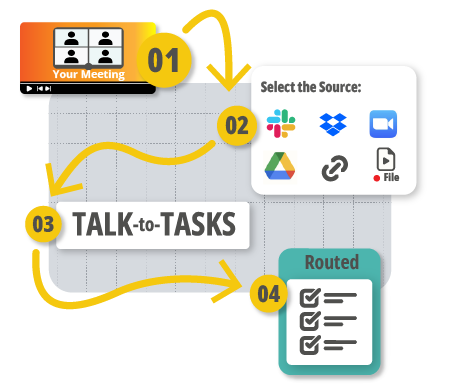
Record your meeting
Choose the Source
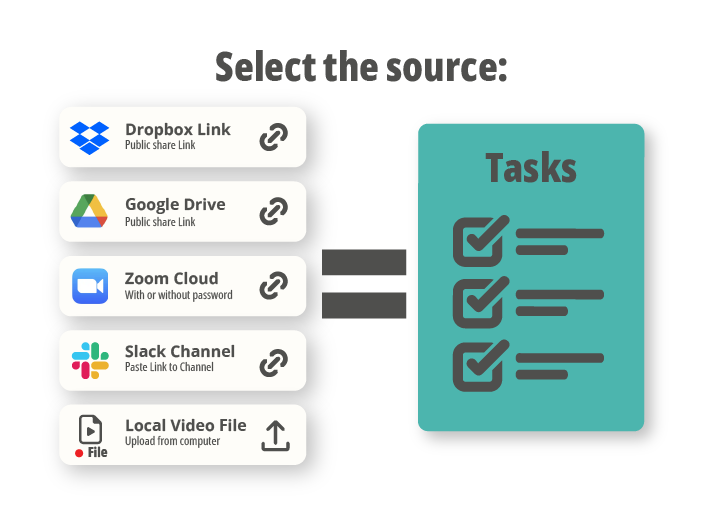
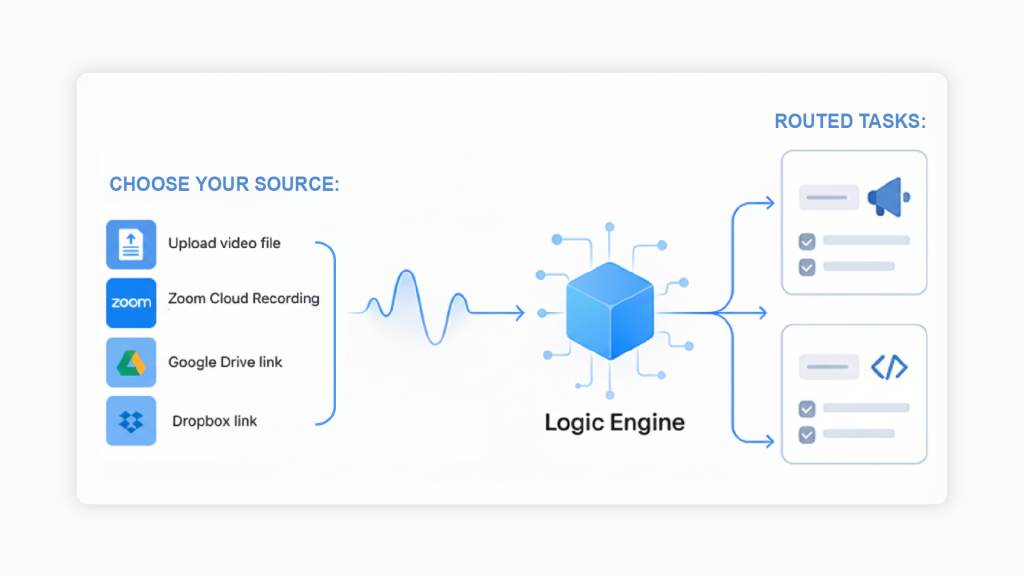
Select the source: upload your video file, use your Zoom Cloud Recording link (with or without a password), or paste a video from Google Drive or Dropbox.
Upload recording
Upload it directly inside the App on the Talks page, or drop it into your dedicated Slack channel so the system can automatically capture and begin processing it.
system identifies the real work from the meeting.
Talk-to-Tasks analyzes the entire conversation and generates a structured list of actionable tasks, capturing decisions, follow-ups, commitments, and responsibilities that arose during the call.
Review, Edit and Execute.
Even when the AI captures the main points well, there are always small notes, clarifications, or missing context that only you can add. This is where you make each task yours: rewrite or tighten the description, add extra details, adjust the priority, assign the right department, or include missing steps. In a few seconds, you turn raw AI output into high-clarity, human-ready tasks your team can act on immediately.
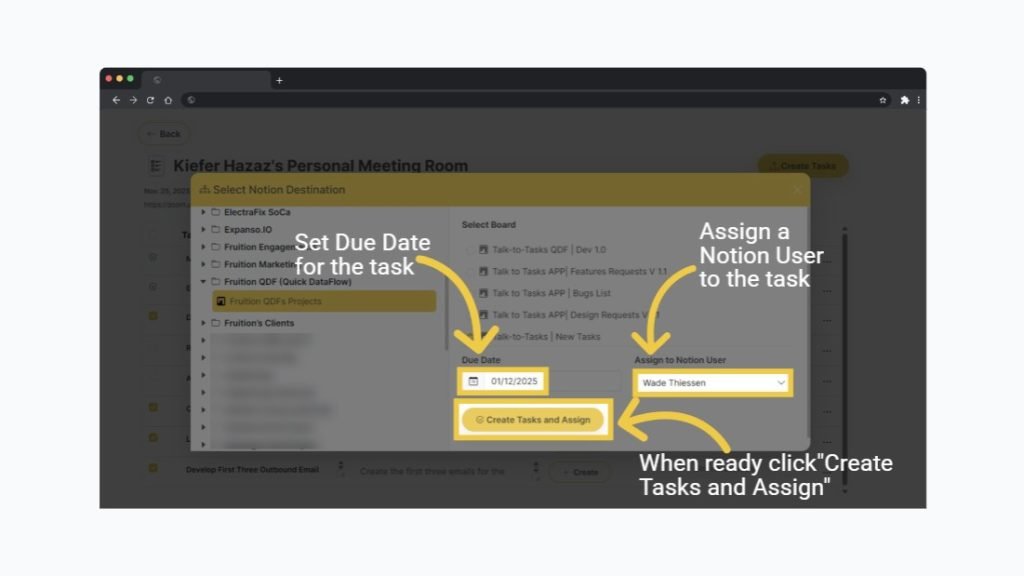
Assign task to the right place and the right person.
Open your list of projects, choose the correct project, select who should own the task, set the due date, and click Create to send it exactly where it belongs.
Access your direct task link immediately.
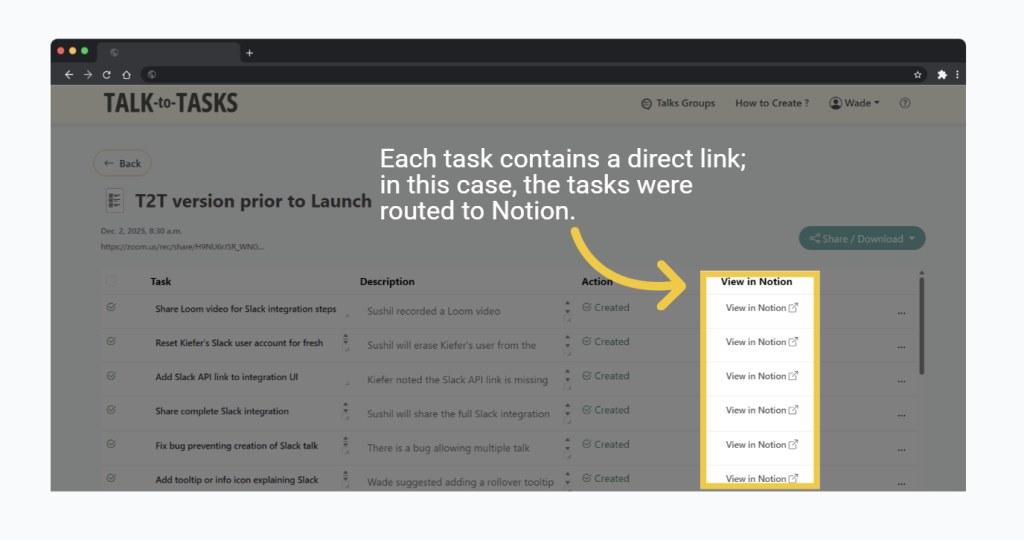
Once created, every task gets a unique link.
You’ll see it instantly inside the App’s *Tasks List*, and if you use Slack, the link appears automatically in the thread of the meeting’s upload.
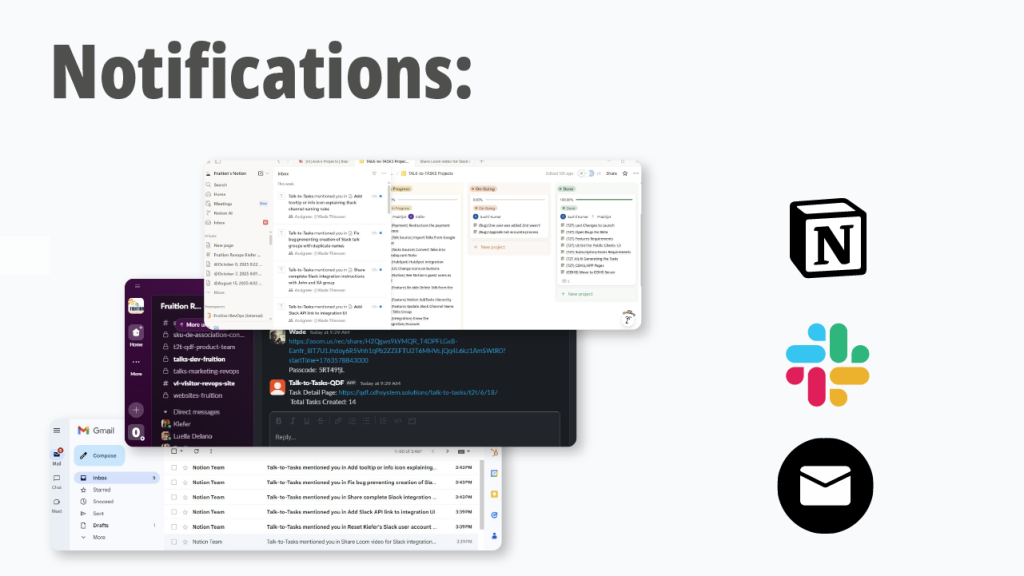
notifies the right team members.
Your existing tools — Notion, Monday.com, Asana, Trello, and others — automatically notify the right person as soon as the task is assigned.
If you’re using Slack with a Talk Group, every created task link appears there as well, keeping everyone aligned with zero extra steps

Record your meeting the way you normally do
Stages
TALK-to-TASKS — Wiki & Essential Concepts
The core building blocks of Talk-to-Tasks — what each term means, how the system works behind the scenes, and why these components matter for your workflow.
A is any meeting recording you send into the system.
It can come from Zoom, Google Meet, Teams, Google Drive, Dropbox, or a direct file upload. Once imported, the system processes the Talk, extracts the decisions and action items, and prepares your task list. Think of a Talk as the “input” — the raw material that becomes real work.
Tasks are the actionable items identified from your meeting.
They can include decisions, follow-ups, deadlines, ownership assignments, commitments, or cross-team responsibilities. Inside the App, you can refine each task, rewrite it, add details, choose the project, assign the owner, and set the due date. Once finalized, the task is created inside your project platform (Notion, Monday.com, Asana, Trello, Excel, or email).
A Talk Group is a dedicated space — usually connected to a specific Slack channel — where your team collaborates around a meeting.
When you upload a meeting link in that channel, Talk-to-Tasks automatically processes it and posts each created task inside the thread of that Talk.
Why this matters:
- Nothing gets lost
- Every task stays in context with the meeting
- Your team sees updates live
- It’s easier than manually uploading or tracking inside the App
Teams using Slack get a fluid, automatic workflow without needing to switch tools.
Talk-to-Tasks was designed with strict privacy in mind.
If you upload a video file, it is deleted immediately after processing.
If you use a Zoom link or Share Drive link, we never store the video itself — only temporary access to extract the tasks.
Once a task is created in your project platform, deleting a Talk never removes the task.
Your data stays in your control, and videos are not stored on our servers beyond processing time.
Account Holder
The owner of the entire workspace — manages billing, plans, and user roles.
Admin
Has full control except billing — can create Groups, manage settings, add Talks, create tasks, and view everything.
Team Member
Can invite new users to Groups, add Talks, assign tasks, and manage collaboration inside Talk Groups. Team Members work across the entire workflow but cannot manage account-level settings.
Guest
Perfect for external collaborators. Guests can assign tasks to projects and view the tasks list, but cannot manage users, create Groups, or change system-level settings.
These roles allow companies to keep control while maintaining flexibility for cross-team and external collaboration.
Slack makes the workflow faster, clearer, and almost completely automated.
By connecting Slack to Talk-to-Tasks, you get:
- A dedicated channel for each Talk Group
- Automatic capture of meeting links
- Automatic task generation
- Automatic posting of task links in the thread
- Zero manual uploading
- Zero copying/pasting
- Zero “Where is that task?” confusion
Instead of bouncing between apps, the entire meeting-to-task flow happens inside the place where your team already communicates.
Nothing gets lost. Nothing disappears.
Slack becomes the bridge between your meetings and your execution.
