
























The Sales Process Automation Your CRM Should Have Built
Sales process automation eliminates the repetitive tasks that eat up your team’s day—lead routing, follow-ups, data entry, proposal generation—so your reps can focus on what actually matters: selling.
- Capture and route leads in seconds, not hours
- Eliminate manual CRM updates and data entry errors
- Run nurturing sequences 24/7 without lifting a finger
- Build consistent, predictable sales workflows

What Sales Process Automation Does
Sales process automation uses software, rules, and integrations to automate the repetitive work that buries your team. Instead of a rep manually logging every call into the CRM, the system does it. Instead of setting reminders for follow-ups, an automated sequence nurtures the prospect while your rep focuses on qualified opportunities.
The core idea is straightforward: your sales reps’ time is most valuable when they’re talking to customers. Yet most teams spend less than 30% of their time actually selling. The rest gets eaten by admin work. Sales process automation reclaims that time.
This isn’t about replacing people. It’s about giving your team a reliable assistant that handles the operational grunt work so they can concentrate on relationships, strategy, and closing deals. When automation is done right, a lean team can perform like a much larger one.
Lead Management
Automatically capture, score, and route new leads to the right person in seconds. No sitting in inboxes. No delays.
Communication
Send personalized follow-up emails, schedule meetings without the back-and-forth, keep prospects engaged automatically.
Data Accuracy
Eliminate human error in data entry. Every interaction gets captured correctly, creating a reliable source of truth for forecasting and strategy.
Why Sales Teams Need Sales Process Automation Now
Speed Wins Deals
A prospect’s interest is highest the moment they engage. Every hour of delay is a lost opportunity. With sales process automation, new leads get scored and assigned in seconds, not days. Your team responds first, builds momentum, and converts more deals.
This isn’t just about being fast. It’s about being consistent. Every lead gets the right attention at the right time, every single time. Manual processes break down at scale. Automation scales effortlessly.
Clean Data Drives Better Decisions
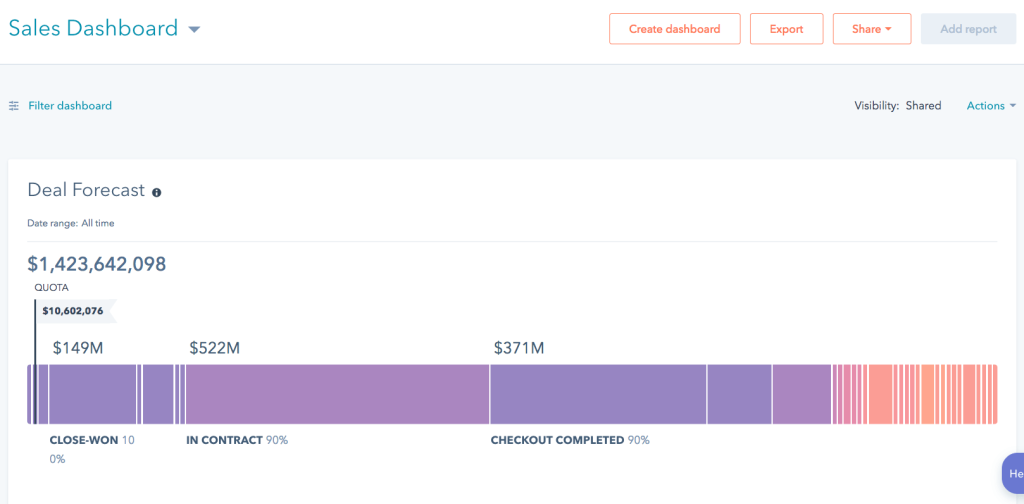
Bad CRM data leads to bad forecasts, which lead to bad decisions. When reps are manually entering data between calls and back-to-back meetings, mistakes pile up. Duplicate records. Missing info. Wrong stages. Sales process automation eliminates manual entry, which means your pipeline data is accurate, your forecasts are reliable, and your team can trust the numbers. Following HubSpot’s CRM best practices for data hygiene amplifies this benefit.
This foundation is critical for revenue operations. When your data is clean, your entire org can see the same picture. Finance knows what’s really in the pipeline. Marketing knows which campaigns actually work. Leadership can make real strategic decisions instead of guessing.
Your Team Focuses on Revenue
Reps are expensive. Every hour they spend on admin is an hour they’re not building relationships or closing deals. When you automate lead routing, follow-ups, and CRM updates, you give them back 5-8 hours per week. That’s real time on the phone with prospects, time to prepare for demos, time to negotiate deals.
The math is simple: more selling time = higher close rates = more revenue. Sales process automation isn’t a cost center. It’s a revenue multiplier.
Where Sales Process Automation Delivers the Biggest Wins
Don’t try to automate everything at once. Target the stages of your sales cycle where automation removes the most friction. Start at the top of the funnel and work your way down.
1. Lead Capture & Routing (Top of Funnel)
When someone fills out a form or lands as a new lead, everything should happen automatically: create the contact, pull in firmographic data, assign to the right rep, send a welcome email. No delays. No manual work. Every inbound lead feels like a hot prospect because your team is responsive. This is where automation creates the biggest impact. One automated lead routing workflow can save hours per week and improve conversion rates by 15-25%. Following a structured lead routing frameworkensures consistency across your team.
2. Nurturing Sequences (Early Engagement)
Not every lead is ready to buy today. Manually following up with “not yet ready” prospects is how deals slip away. Automated email sequences keep your brand top-of-mind and build trust without any rep effort. Enroll a prospect in a 3-part series about your solution, and the system handles delivery while your team focuses on hot leads.
3. Deal Stage Workflows (Active Sales Cycle)
When an opportunity moves to “Proposal Sent,” automated workflows can instantly create tasks, notify stakeholders, or generate documents. This keeps deals moving and ensures critical next steps never get forgotten. Consistency across your team means deals move through the pipeline predictably.
4. Post-Sale Handoff (Closed-Won)
The moment a deal closes, automation can notify your finance team to generate an invoice, alert your success team to schedule a kickoff, and send the customer a welcome sequence. This creates a seamless, professional transition that sets the tone for a long customer relationship.
Manual vs. Automated: What Changes
This is where automation creates the biggest impact. Here’s what changes when you automate.
| Activity | Manual Approach | With Automation |
|---|---|---|
| Lead Capture | Rep manually enters contact info into the CRM after seeing a form notification. | System instantly creates a contact and opportunity record the moment the form is submitted. |
| Lead Qualification | Rep reviews lead info and decides if it's worth pursuing; no consistent scoring. | Lead scoring rules automatically evaluate and rank prospects. Hot leads bubble to the top instantly. |
| Lead Assignment | Manager manually assigns leads to reps, or reps fight over who gets them. | Rules instantly route leads based on territory, industry, or workload. Fair and predictable. |
| Follow-Up Emails | Rep sends sporadic follow-ups from memory or calendar reminders. | Personalized sequences run 24/7. Every prospect gets consistent touch points on schedule. |
| CRM Updates | Rep manually logs calls, emails, and outcomes. Data is often incomplete or delayed. | Every interaction is captured automatically. Pipeline data is always current and accurate. |
| Task Management | Rep creates tasks manually or relies on memory. Critical next steps get missed. | System auto-creates tasks when deals move stages. Nothing falls through the cracks. |
| Proposal Generation | Rep spends 1-2 hours copying CRM data into a Word template. | Professional, customized proposal generated in 2 minutes with a single click. |
How Fruition Builds Sales Process Automation
Architecture First
We don’t just wire up tools. We start by understanding your sales process, your team, and your specific bottlenecks. Using frameworks like the SAE Map, we map out your funnel, identify where automation will create the most impact, and design workflows that fit how your team actually works.
Modular, Not Monolithic
Rather than one giant, brittle automation that breaks when something changes, we build modular workflows powered by Quick Data Flow (QDF). You start with lead routing. Later, you add nurturing. Then deal management. Each piece works independently and together. This means you can grow and scale without ripping everything out and starting over.
Data Governance at the Core
Sales process automation only works if your data is clean. The Centralized Data Hub System (CDHS) ensures that before automation runs, data is standardized, validated, and routed according to your actual business rules. This is why our automation actually improves data quality instead of amplifying bad data.
Adoption Matters
The best automation in the world is useless if your team doesn’t use it. We build with your reps in mind. Clear workflows. Easy interfaces. Time savings that are obvious on day one.
Connected Stack
Sales process automation doesn’t live alone. We connect it to your CRM, your marketing automation, your data hub via Let Data Flow, and your downstream tools. Everything talks to everything else. No data silos. No manual handoffs.
Continuous Improvement
We don’t build automation and disappear. We monitor performance against your goals, gather feedback from your team, and refine workflows based on what’s actually working. Automation improves over time.
Getting Started: Implementation Checklist
Phase 1: Discovery
- Map your current sales cycle from lead to close
- Identify bottlenecks where reps spend the most time
- Set measurable goals (time saved, conversion lift, cycle time)
- Audit CRM data quality and flag cleanup work
Phase 2: Build & Test
- Start with one high-impact workflow (lead routing or nurturing)
- Test with a pilot group to catch edge cases
- Gather feedback and refine before full rollout
- Document the workflow so it's easy to maintain and evolve
Phase 3: Launch & Train
- Train your team on how and why the workflow helps them
- Go live with the full team and monitor adoption
- Track results against your Phase 1 goals
- Plan the next workflow to automate based on Phase 1 learnings
Mistakes to Avoid
Automating a Broken Process
If your current sales workflow is disorganized, automation will just help you do the wrong things faster. Fix your process first, then automate it.
Trying to Automate Everything at Once
Boiling the ocean is a recipe for frustration and poor adoption. Start with one high-impact workflow, prove value, then expand.
Ignoring Data Quality
Bad data in = bad automation out. Duplicates, missing fields, and wrong stage assignments will break your workflows and frustrate your team.
Skipping Team Training
The best automation is useless if your team doesn’t understand it or doesn’t adopt it. Invest in proper onboarding and show them the time savings immediately.
Replacing Relationships with Bots
Automate the transactional tasks, not the relational ones. Email sequences work. Generic templates don’t. Your reps should handle high-value conversations.
Not Measuring Results
Without metrics, you can’t prove ROI or know what to improve. Track: time saved per rep, lead response time, conversion rate lift, cycle time reduction. Using a structured RevOps framework helps you measure what matters.
Common Questions
What exactly is sales process automation?
Sales process automation uses software and rules to automate repetitive sales tasks like lead capture, qualification, routing, follow-ups, CRM updates, and proposal generation. It frees your team from manual admin work so they can focus on building relationships and closing deals. Think of it as a tireless digital assistant handling the operational tasks.
How much time does sales process automation actually save?
Sales reps typically spend only 28% of their time actually selling. The rest is admin work. Sales process automation can reclaim 5-8 hours per week by automating lead capture, follow-ups, data entry, and task management. That’s time converted directly into more client interactions, better deal preparation, and higher close rates.
Does sales process automation replace sales reps?
No. Sales process automation replaces admin work, not people. It handles data entry, lead routing, and follow-up sequences so your team can spend more time on high-value activities like discovery calls, product demos, negotiations, and relationship building. A smaller team with automation can outperform a larger team without it.
Where should we start automating our sales process?
Start at the top of your funnel. Automate lead capture and routing first—this creates the biggest immediate impact. Every second saved on lead assignment is money in the bank. Then move to nurturing sequences and deal stage workflows. Avoid trying to automate everything at once; focus on one high-impact workflow, prove the value, then expand systematically.
How do we ensure our team actually adopts sales process automation?
Adoption depends on two things: clear communication and immediate value. Explain why the automation matters to your team—show them the time savings, the reduced admin burden, and how it helps them hit their numbers. Start with a pilot group, gather feedback, and refine before rolling out to the whole team. When reps see automation as a tool that helps them sell more, they’ll want to use it.
What about data quality concerns?
Bad data can break sales process automation. Before you build any workflows, audit your CRM. Clean up duplicates, fill in missing fields, and standardize data. Then build automation with data governance rules: validate inputs, enforce field requirements, and catch errors before they spread. Clean data is the foundation of reliable automation.
How is sales process automation different from marketing automation?
Sales process automation focuses on the sales cycle: lead routing, deal management, proposal generation, follow-ups. Marketing automation focuses on lead generation and nurturing at scale: email campaigns, social posting, ad management. They’re complementary. When aligned, marketing automation generates qualified leads that sales process automation routes and nurtures until the sales team takes over.
Stop Wasting Hours on Manual Tasks
According to Forrester research, the most successful sales organizations have automated the majority of repetitive sales tasks. Sales process automation gives your team back the time they need to focus on relationships and closing deals.
