



























Digital Process Automation and ERP Integration: What Actually Makes It Work
Digital process automation (DPA) is not a new idea. What is new is how often it breaks, specifically at the ERP layer. Teams spend months selecting a DPA platform, map out every workflow they want to automate, and then hit a wall the moment their CRM and ERP need to talk to each other. The data does not sync cleanly. The triggers fire late or not at all. Finance is still reconciling by hand. The promise of automation is still sitting in a slide deck.
The reason this keeps happening is rarely the platform. It is the architecture underneath it. This guide walks through what digital process automation is, why ERP integration is the point where most implementations fail, the integration patterns you can choose between, and a checklist for evaluating any DPA platform before you commit to it. The goal is to leave you able to make a better decision, whether you build it yourself, hire a vendor, or bring in a partner.
What Is Digital Process Automation?
Digital process automation is the practice of replacing manual, human-executed steps in a business process with rules-based logic that runs automatically across your systems. A deal closes in your CRM. The invoice is created in your billing platform. The customer record is provisioned in your delivery system. The ERP is updated. Nobody types anything. Nobody sends a handoff email. The process runs.
That is digital process automation working correctly. It is distinct from robotic process automation (RPA), which mimics human actions in a UI (clicking, copying, pasting) and breaks every time a screen layout changes. DPA works at the data layer, not the interface layer. Triggers are events. Outcomes are governed data flows. Because DPA operates on data and APIs rather than screen actions, it is more durable, easier to audit, and far more scalable than RPA, but it depends on the underlying data being clean and consistent.
The scope of what DPA can cover is wide: lead routing, contract triggers, billing automation, inventory updates, support ticket escalation, revenue recognition flags. But the category that breaks most consistently, and costs the most when it does, is the handoff between operational systems and the ERP.
Why ERP Integration Is Where Digital Process Automation Fails
ERP systems are the center of gravity for finance and operations. They hold the numbers that matter: revenue recognized, inventory on hand, payables outstanding, customer lifetime value by entity. Every other platform in a business produces data that eventually needs to reconcile against what the ERP says. That reconciliation is where most digital process automation implementations quietly fall apart.
The typical failure mode looks like this. A team implements a DPA platform and connects it to their CRM and their billing tool. Workflows run. Deals close. Invoices generate. Then someone in finance asks why recognized revenue does not match the CRM pipeline, why three accounts are showing different customer IDs across systems, or why the ERP booking date is two days behind the contract signature date. The answer, almost always, is that the integration was built as a one-way push, not a governed two-way flow. Data moved, but it was never validated, never deduplicated, and never tied to a single agreed-upon source of truth.
There are a handful of specific reasons ERP integration is harder than integrating any other system in your stack. Understanding them upfront is the difference between a project that lands and one that stalls:
Strict, unforgiving field requirements. ERPs enforce rules that CRMs do not. A required tax code, a mandatory GL account, a specific entity assignment. A record that a CRM accepts happily will be rejected outright by the ERP, and if nobody is watching, that rejection is silent.
Entity structures that do not map to CRM objects. A single customer in your CRM might be three legal entities in your ERP, each invoiced separately, each with its own currency and tax treatment. If the integration does not resolve this mapping, the numbers will never reconcile.
Update cycles that break point-to-point connections. A direct API connection between a workflow tool and an ERP may work on Tuesday and fail silently on Thursday after a minor platform update changes a field. Without monitoring and alerting, that failure is invisible until someone notices the numbers are wrong, usually at month-end.
Timing and sequence dependencies. The ERP often needs data in a specific order: create the customer, then the order, then the invoice, then the payment. Fire those events out of sequence and the ERP either rejects them or, worse, accepts them into an inconsistent state.
None of this is a vendor problem. NetSuite, SAP, QuickBooks, and Xero are all capable systems. The problem is treating ERP integration as a last step rather than the foundation the automation is built on.
The Four Integration Patterns, and When Each One Fits
Before evaluating any platform, it helps to understand the four ways systems actually get connected. Most DPA failures trace back to choosing the wrong pattern for the situation, so this is worth understanding regardless of which tools you use.
| Pattern | How it works | Best for | Where it breaks |
|---|---|---|---|
| Point-to-point | Each system connects directly to each other system, one integration per pair | Two or three systems, simple flows, low change frequency | Every new system multiplies the connections. Five systems means up to ten integrations to maintain. One field change cascades everywhere. |
| Native / built-in connectors | A platform ships a pre-built connector to another named platform | Common, stable pairings (HubSpot to QuickBooks) with standard fields | Connectors cover the common 80%. Custom fields, multi-entity, and edge cases usually fall outside what the connector handles. |
| iPaaS (integration platform) | A middleware layer (Workato, Zapier, Make) sits between systems and routes data | Many systems, moderate complexity, teams comfortable maintaining flows | Handles movement well but rarely enforces a source of truth. Conflicting records still conflict; it just moves the conflict faster. |
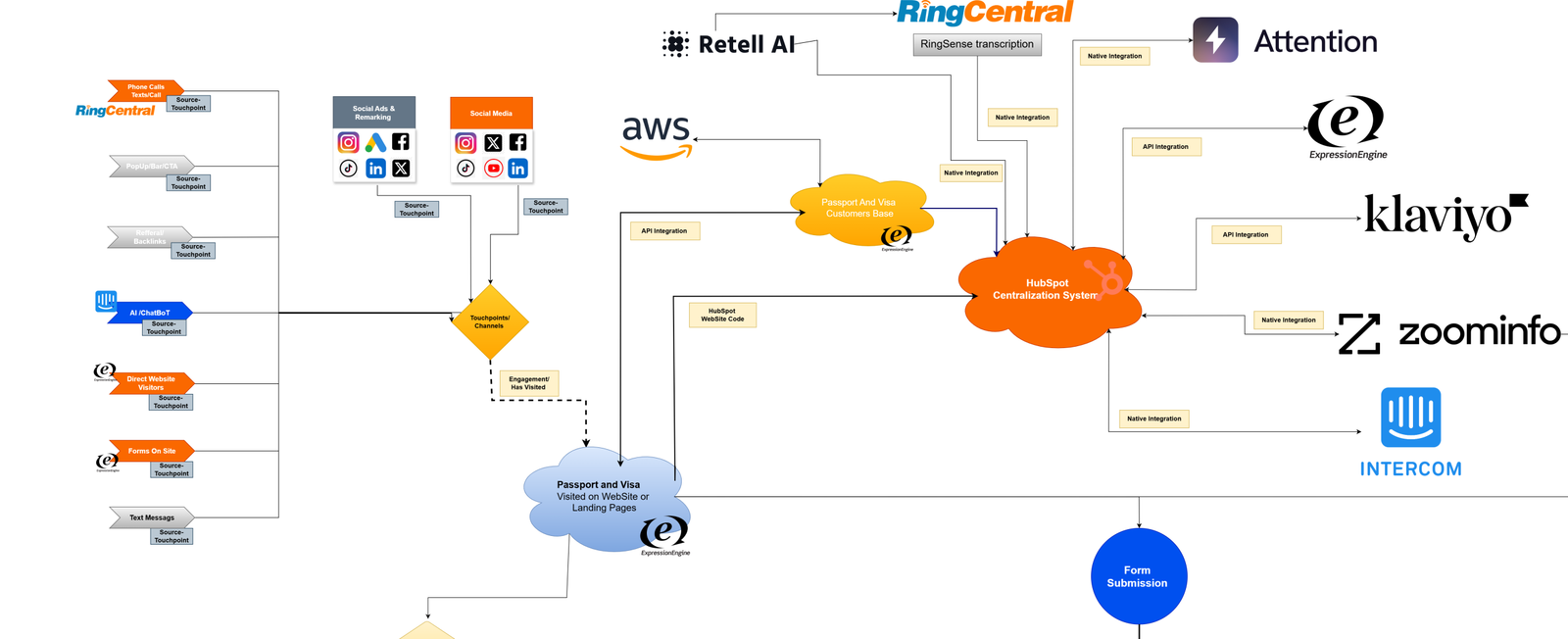
| Centralized data hub | A governed middle layer holds the master record for each object and syncs outward | Multi-system stacks where reconciliation and data integrity are critical | More upfront design work. Overkill for a two-system flow, essential once finance needs numbers to reconcile. |
The pattern most teams reach for first is native connectors, because they are fast to switch on. The pattern most teams end up needing, once the ERP is involved and finance is depending on the output, is a centralized hub. The mistake is discovering that gap after the workflows are already built on top of the wrong foundation.
What Good Digital Process Automation Architecture Looks Like
The teams that get ERP integration right share one characteristic: they build the integration layer before they build the workflows.
In practice, that usually means establishing a governed data layer where every core business object has a canonical definition, a master record, and a unique identifier that travels across every connected system. When a deal closes in the CRM, it does not just fire a raw invoice into the ERP. It creates or updates a master account record, which then propagates to the ERP with the correct entity mapping, field values, and currency treatment, and writes the result back to the CRM so both systems agree.
This governed layer is also what makes the whole thing maintainable over time. When the ERP updates and changes a field structure, the fix happens once, in the hub, not across a dozen individual workflow connections. When a new product line is added, its data definition is governed centrally and flows out correctly to every downstream system from day one. Without a layer like this, automation runs on top of messy data and simply produces messy results faster. With it, automation runs on top of a single source of truth.
You do not need a specific product to apply this principle. What you need is a deliberate answer to three questions before you automate anything: which system owns each piece of data, how conflicts get resolved when two systems disagree, and how a failed sync gets detected and retried. A team that can answer those three questions clearly will succeed with almost any toolset. A team that cannot will struggle with even the best one.
How to Evaluate a DPA Platform for ERP Integration
Vendor demos are designed to show the happy path. The questions below are the ones that surface how a platform behaves when reality is messier than the demo. Use this as a checklist when evaluating any digital process automation platform, or when auditing one you already run.
Data integrity and conflict handling
- When two systems hold different values for the same record, how does the platform decide which one wins?
- Can it enforce a single source of truth per field, or does it just copy data in one direction?
- Does it deduplicate records, or will the same customer appear three times?
ERP-specific handling
- Does it support multi-entity and multi-currency mapping, or only one-to-one record sync?
- Can it enforce the ERP's required fields and reject or hold records that would fail validation?
- Does it respect sequence dependencies (customer before order before invoice)?
Failure handling
- When a sync fails, does anyone get alerted, or does it fail silently?
- Is there automatic retry logic, and a queue for records that need manual review?
- Can you see an audit trail of what synced, what did not, and why?
Maintainability
- When the ERP changes a field, how many places do you have to update the fix?
- Who maintains the integration after go-live: you, the vendor, or a partner?
- What happens to your automations if the platform has an outage?
If a vendor cannot answer the data-integrity and failure-handling questions clearly, that is the signal to keep looking. As industry analysts including Gartner have consistently found, data quality and integration architecture are stronger predictors of automation ROI than platform features or workflow complexity. The question to ask any vendor is not how many integrations they support. It is how they handle data conflicts when two systems disagree on the same record.
Build, Buy, or Partner?
Once you understand the architecture, the practical question is who does the work. There are three honest options, each with a real trade-off.
Build it in-house if you have engineering capacity and the integration is relatively contained. You keep full control and there are no ongoing vendor fees, but you also own every future ERP update, every edge case, and the institutional knowledge risk if the person who built it leaves.
Buy a platform and self-manage if your flows map cleanly to native connectors and your data is already reasonably clean. This is the fastest path to a working automation, but platforms handle movement better than they handle governance, so you are still responsible for resolving conflicts and defining the source of truth.
Bring in a partner if the ERP integration is complex, finance depends on the output reconciling, or you have already tried to wire the stack together and found the ERP is still the sticking point. The trade-off is cost and coordination, in exchange for someone who has solved these specific problems before.
There is no universally correct answer. The right choice depends on the complexity of your stack, the cleanliness of your current data, and how much of your finance and operations reporting depends on the automation being correct. What matters is choosing deliberately, with the architecture questions answered first, rather than buying a platform and hoping the integration sorts itself out.
For teams that decide a partner is the right fit, Fruition RevOps designs the governed integration layer between existing platforms, using a Centralized Data Hub System (CDHS) approach that establishes a single source of truth before any workflow automation runs. That is one path among several, and the principles in this guide apply no matter which you choose.
Frequently Asked Questions
What is the difference between digital process automation and robotic process automation?
Robotic process automation (RPA) works at the interface layer: it mimics human actions in a UI, like clicking buttons and copying data between screens. Digital process automation works at the data layer, using event-based triggers and governed data flows to move information between systems through APIs. DPA is more reliable, more maintainable, and more scalable than RPA, but it requires a cleaner underlying data architecture to work correctly.
Why does ERP integration fail more often than other integrations?
ERPs enforce strict field requirements, use entity structures that do not map cleanly to CRM objects, depend on events arriving in a specific sequence, and change their field structures during updates. Any of these can break a point-to-point integration silently. Integrations that treat the ERP as the foundation, rather than the last system to connect, are far more resilient.
Can digital process automation work if our ERP data is already messy?
It can, but the first step is cleaning and governing the data before automating against it. Automating on top of messy ERP data does not fix the mess. It moves it faster and makes it harder to find. Identifying and resolving data quality issues before building any automation is what keeps the workflows running against clean inputs from day one.
Do we need to replace our current platform to fix ERP integration?
Usually not. In most cases the platforms are fine and the gap is in the integration and governance layer between them. The fix is defining a source of truth, adding conflict resolution, and building in failure handling, not swapping out tools you have already invested in.
What is the single most important thing to get right?
Deciding, before you automate anything, which system owns each piece of data and how conflicts get resolved when two systems disagree. A team that answers that clearly will succeed with almost any toolset. A team that skips it will struggle with even the best one.
