
























What Is an Integration Platform as a Service, and Why Most Businesses Get It Wrong
An integration platform as a service is the layer that makes every tool in your business work from the same data, and without it, every automation you build is one API change away from failing. Most growing businesses don’t know they need one until they’re already buried in manual cleanup, duplicate records, and reports that contradict each other depending on who ran them.
The tools exist. HubSpot tracks your contacts. NetSuite manages your billing. CIN7 moves your inventory. Monday.com holds your tasks. Each one works. Together, they create a version of the truth that changes depending on which platform you open, and the gap between those versions is where revenue quietly disappears.
According to a Forrester study, organizations that deploy without a proper integration layer face an average of $2.1 million in added costs from rework, lost customers, operational downtime, and compliance exposure. The companies that avoid those costs aren’t necessarily using better tools. They’re using a smarter architecture.
Integration Platform as a Service, Defined
An integration platform as a service connects your business systems at the governance level. It assigns unique identifiers to every customer, order, and transaction across your stack. It enforces naming standards so the same contact doesn’t live under three different spellings in three different platforms. It routes records according to rules your team defines once, and then executes on every record that follows. The result is a single source of truth that every department works from, whether they’re in HubSpot, NetSuite, or anything else.
That governance layer is what separates an iPaaS from a data pipeline or a webhook. A pipeline moves data. An iPaaS manages what that data means, where it belongs, and what happens when something upstream changes. When a vendor updates their API schema, a governed integration layer catches the discrepancy before it corrupts your records. An unmanaged automation chain passes the error downstream and lets it compound.
The organizations reporting the strongest productivity gains from their systems share one common priority: they treat integration as a top-two strategic focus, not an IT afterthought.
What iPaaS Is Not
Workflow automation tools like n8n, Zapier, and Make are powerful. They connect apps, trigger actions, and eliminate repetitive manual steps. For the right use case, they are exactly the right tool. What they are not is a governance layer. They move information from point A to point B without asking whether that information is clean, deduplicated, or routed to the right place. At low volume and low complexity, that distinction rarely matters. As your stack grows and your data volume scales, it becomes the difference between a business that runs on reliable information and one that runs on whoever updated the spreadsheet last.
Why Integration Is the Most Important Decision in Your Stack
Most businesses treat integration as an infrastructure problem. Something for IT to sort out after the strategy is set. That framing is expensive.
The cost doesn’t announce itself all at once. It shows up as a sales rep re-entering data that already lives in another system. A finance team reconciling numbers that don’t match what HubSpot reported last week. An ops manager who can’t answer a simple question about a customer’s order history without opening four tabs. Each of those moments is a small leak. Together they’re the reason revenue leakage is so hard to pin down.
The Hidden Cost of Point-to-Point Automation
Workflow automation makes the leaks harder to find, not easier.
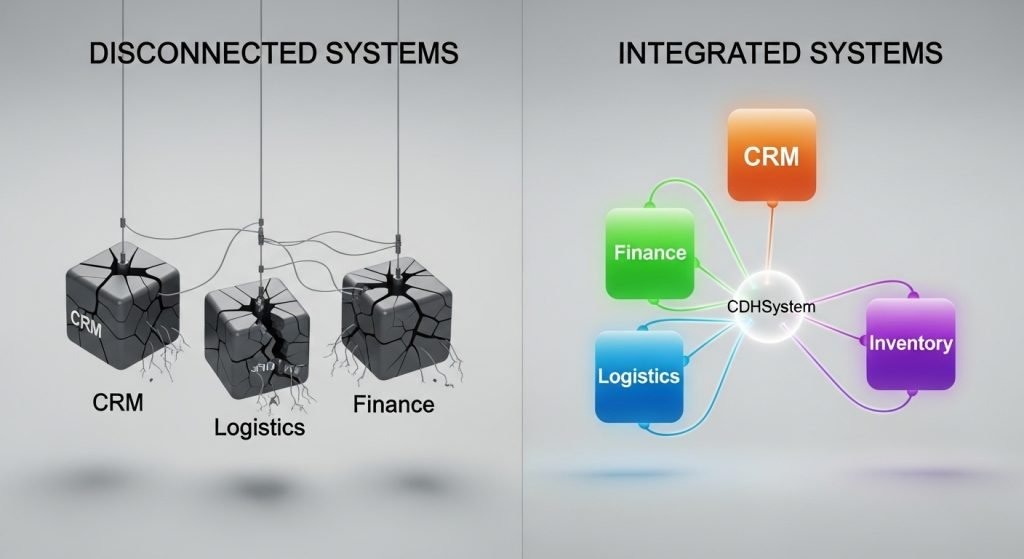
When you connect two systems directly and something upstream changes, the automation passes the error forward. The record lands in the wrong place, or doesn’t land at all, and nobody knows until a customer calls or a report doesn’t balance. McKinsey found that employees at growing companies spend nearly one full day each week searching for information or fixing inconsistencies caused by disconnected systems. Automating those disconnected systems doesn’t fix the inconsistency. It just moves it faster.
A real integration layer catches the discrepancy at the source. The error doesn’t travel.
What n8n Does Well, and Where It Stops
n8n is a legitimate tool. For the right use case, it’s exactly what a team needs: an open-source workflow engine that connects apps, triggers actions, and cuts out repetitive manual steps. It’s flexible, affordable, and because it’s self-hostable, companies can adapt it without paying per-seat licensing fees.
The workflows it handles well are event-driven and linear. A deal closes in HubSpot, a task gets created in Asana. A new order comes in, a Slack notification fires. A customer record updates, a row gets pushed to a reporting sheet. Clean, fast, useful.
When n8n Is the Right Call
If your stack is two or three tools, your data is relatively clean, and your workflows are stable, n8n covers the job. Teams early in their growth, running simple operations with predictable data, get real value from it without overbuilding.
The problem isn’t n8n. The problem is what happens when the business grows past it.
When n8n Becomes a Liability
Every direct connection n8n creates is a dependency. When one platform updates its API schema, every workflow touching that connection is at risk. There’s no central layer catching the change. There’s no deduplication running before the record lands. There’s no routing rule deciding which rep gets the lead or which event the contact gets stamped to in HubSpot.
What starts as six automations becomes sixty. Sixty becomes a web nobody fully understands, maintained by whoever built it, fragile in ways that only surface at the worst possible moment.
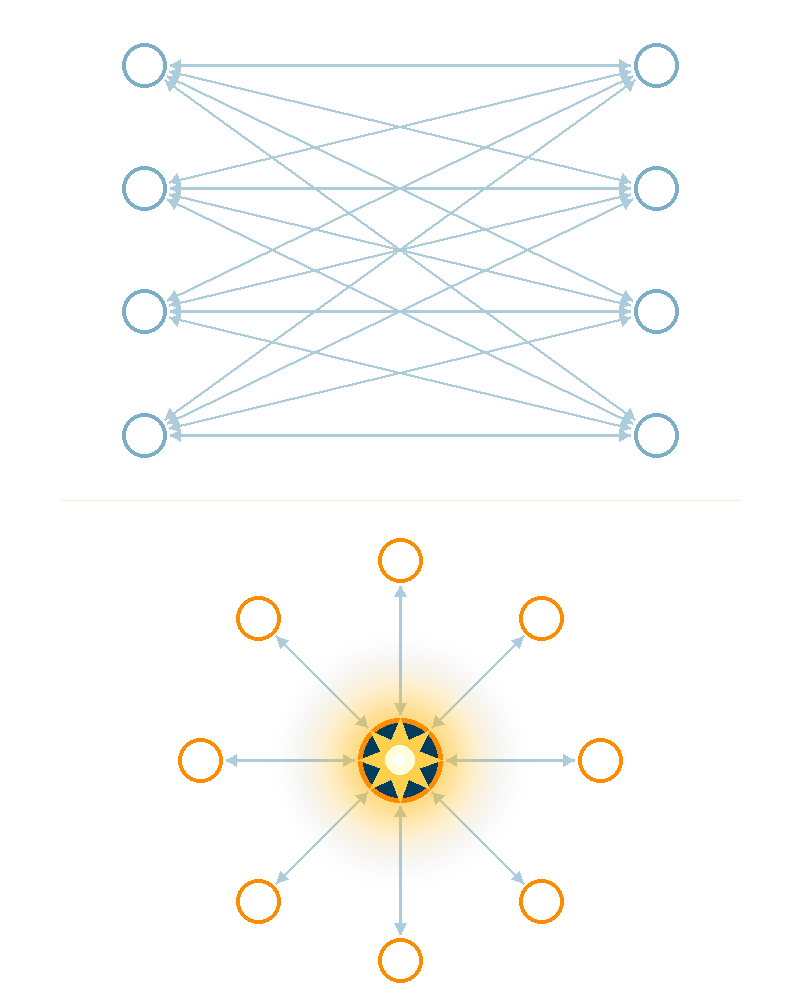
A survey by Ironside Group found that 42% of data and analytics leaders consider the hub-and-spoke model the ideal architecture for their organizations, specifically because point-to-point automation can’t scale. The issue isn’t the number of automations. It’s that none of them share a data centralization layer underneath.
How CDHS Works as an Integration Platform as a Service
The Centralized Data Hub System is Fruition’s answer to what most businesses are actually missing: not more automation, but a governed architecture that makes all their existing platforms agree with each other.
Where n8n connects A to B, CDHS sits in the middle of everything. Every customer, order, and transaction that moves through your stack gets assigned a unique identifier at the hub level. That ID follows the record into HubSpot, NetSuite, CIN7, and every other connected platform. When finance pulls a report, it matches what sales sees. When ops looks up an order, it traces back to the same contact marketing touched six months ago. The data doesn’t drift because there’s one place it’s governed from.
The governance layer handles three things your automation stack can’t: deduplication before a record lands, routing rules that fire on every record without exception, and full traceability across every system in your stack. When a vendor updates their API, CDHS catches the discrepancy before it propagates. Your teams don’t find out about it on Friday afternoon when a report doesn’t balance.
How QDF Fits Into the Picture
Quick Data Flows (QDF) are the execution layer that sits on top of CDHS. Where CDHS is the architecture, a QDF is the repeatable play for a specific data movement: syncing event leads from an upload into HubSpot, routing contacts to the right rep based on rules the ops team defines, reconciling billing records between NetSuite and your CRM.
Each QDF runs inside the governed environment CDHS provides. The deduplication, the unique IDs, the routing rules are already in place. The QDF executes the specific flow the business needs, cleanly, every time, without a developer watching over it.
That combination of governed architecture and repeatable execution flows is what a business running on HubSpot and a handful of other platforms actually needs from a data integration layer.
Why n8n and CDHS Work Better Together
The comparison most buyers expect is a choice: n8n or a centralized data hub. In practice, the businesses that get the most out of both treat them as two different layers of the same system.
CDHS governs the core data. Every record entering the stack gets deduplicated, assigned an ID, and routed according to rules the ops team defines. That layer runs underneath everything. n8n then handles the task automation that sits on top: generating a PDF when a deal closes, firing a Slack alert when an order threshold is hit, scheduling a follow-up when a contact reaches a certain stage. Those workflows run reliably because the data they’re touching is already clean.
The failure mode most teams hit is building the automation layer first, before any governance exists underneath. The workflows run. The data they’re moving is inconsistent. The reports built on top of that data contradict each other. Adding more automation at that point accelerates the problem rather than fixing it.
Getting the architecture in the right order matters more than the tools themselves. Governed data first. Automation on top of it. In that sequence, n8n and CDHS do exactly what each one is built for, without either one carrying a job it wasn’t designed to handle.
If you’re not sure where your stack currently sits, the Systems Automation Engagement (SAE) Map is the diagnostic that shows you where your revenue flow is breaking and what to prioritize first.
How to Know Which Approach Your Business Needs
Most businesses don’t go looking for an integration platform as a service until something has already broken. A report that doesn’t match. A lead that fell through because it landed in the wrong system. A reconciliation that took three people two days to untangle. By the time the problem is visible, it’s been compounding for months.
The earlier question, the one worth asking before something breaks, is whether your current setup is built to scale or just built to function right now.
Signs You've Outgrown Workflow Automation
There are four signals that you have an architecture problem, and need a governance layer to resolve it.
Your Team Is Re-Entering Data That Already Exists
Someone on your team regularly spends time cleaning or re-entering data that already lives somewhere else in the stack. The data has no single home, so people fill the gap manually.
Different Departments Report Different Numbers
Finance pulls one figure, sales pulls another, and both are technically correct depending on which platform they’re looking at. When the same metric produces different answers, the integration layer is the missing piece.
New Hires Can't Trace a Customer Record Without Help
If onboarding someone means explaining which system to trust and in what order, the architecture isn’t documented anywhere a machine can enforce. It lives in people’s heads.
Integrations Break Every Time a Vendor Pushes an Update
No central layer is catching API changes before they hit your data. The break surfaces downstream, usually at the worst possible moment, and whoever finds it has to trace it back manually.
The right starting point is understanding exactly where the breaks are before deciding what to build. A data centralization audit maps the specific points in your revenue flow where data is leaking, stalling, or contradicting itself across platforms. From there, the decision between workflow automation and a full integration layer becomes straightforward rather than a judgment call made on instinct.
Frequently Asked Questions
What does an integration platform as a service actually do?
An integration platform as a service connects your business systems at the governance level, not just the workflow level. It assigns unique identifiers to records, enforces naming standards, deduplicates contacts before they land, and routes data according to rules your team defines. The result is every platform in your stack working from the same version of the truth, without requiring your teams to change the tools they already use.
How is iPaaS different from workflow automation tools like n8n or Zapier?
Workflow automation tools move data from one place to another when a trigger fires. An iPaaS governs what that data means, where it belongs, and what happens when something upstream changes. n8n can tell HubSpot to create a task when a deal closes. It can’t tell you why the same contact appears three times across your CRM, your billing system, and your event list, or which one is correct. That’s a governance problem, and it’s what an iPaaS is built to solve.
Can a small business use an integration platform as a service?
It depends on the complexity of the stack, not the size of the company. A 30-person business running HubSpot, NetSuite, and an inventory platform with high transaction volume has a real integration problem. A 200-person business running two tools with stable, predictable data flows may not. The question worth asking is whether your current setup produces a reliable single source of truth across every department. If the answer is no, the business has likely outgrown workflow automation regardless of headcount.
What is the first step to getting your systems properly integrated?
Before deciding on any tool or architecture, map where your revenue flow is actually breaking. Most businesses assume they know where the gaps are and find out during a diagnostic that the real breaks are upstream of where the symptoms show up. A Systems Automation Engagement (SAE) Map surfaces exactly where data is leaking, stalling, or contradicting itself across your platforms, and gives you a prioritized view of what to fix first before any build begins.
See Where Your Integration Is Breaking
Your systems are running. The question is whether they’re running on the same data. If different platforms are producing different answers, the fix isn’t more automation on top of what’s already there. A free SAE Map shows you exactly where your revenue flow is breaking and what to prioritize first, before you build anything else.
